
Download Paint a File – digital painting, art creation, creative tools, drawing app, sketching app, creative software, digital sketching, artistic expression, creative app, art software
Overview
Paint a File is a digital painting application developed for Android users seeking a streamlined tool for artistic expression. Designed to support users across various skill levels, the app provides a platform for creating detailed artwork with ease. Its core purpose lies in enabling users to translate creative ideas into digital form, offering a flexible environment for sketching, illustrating, and producing finished pieces. The app addresses common challenges faced by digital artists, such as limited format compatibility and complex workflows, by integrating multi-format export capabilities directly into the creative process.
Target users include hobbyists exploring digital sketching, students working on visual assignments, and professionals requiring a lightweight yet capable tool for quick concept work. The app’s emphasis on simplicity and accessibility makes it suitable for beginners while still offering enough functionality to support more experienced creators. Although the developer did not provide additional background on the development team, the app’s release on August 6, 2024, signals a recent entry into the productivity and creative software space.
Real-world use cases include creating visual content for school projects, drafting presentation materials in PDF or PPTX format, and producing animated sketches as GIFs. Its ability to export to formats like SVG and DOCX also supports integration with other digital workflows. In the broader app ecosystem, Paint a File fills a niche by combining intuitive design with practical output versatility, positioning itself as a lightweight alternative for users who prioritize ease of use and cross-format compatibility.
Key Features & Functionality
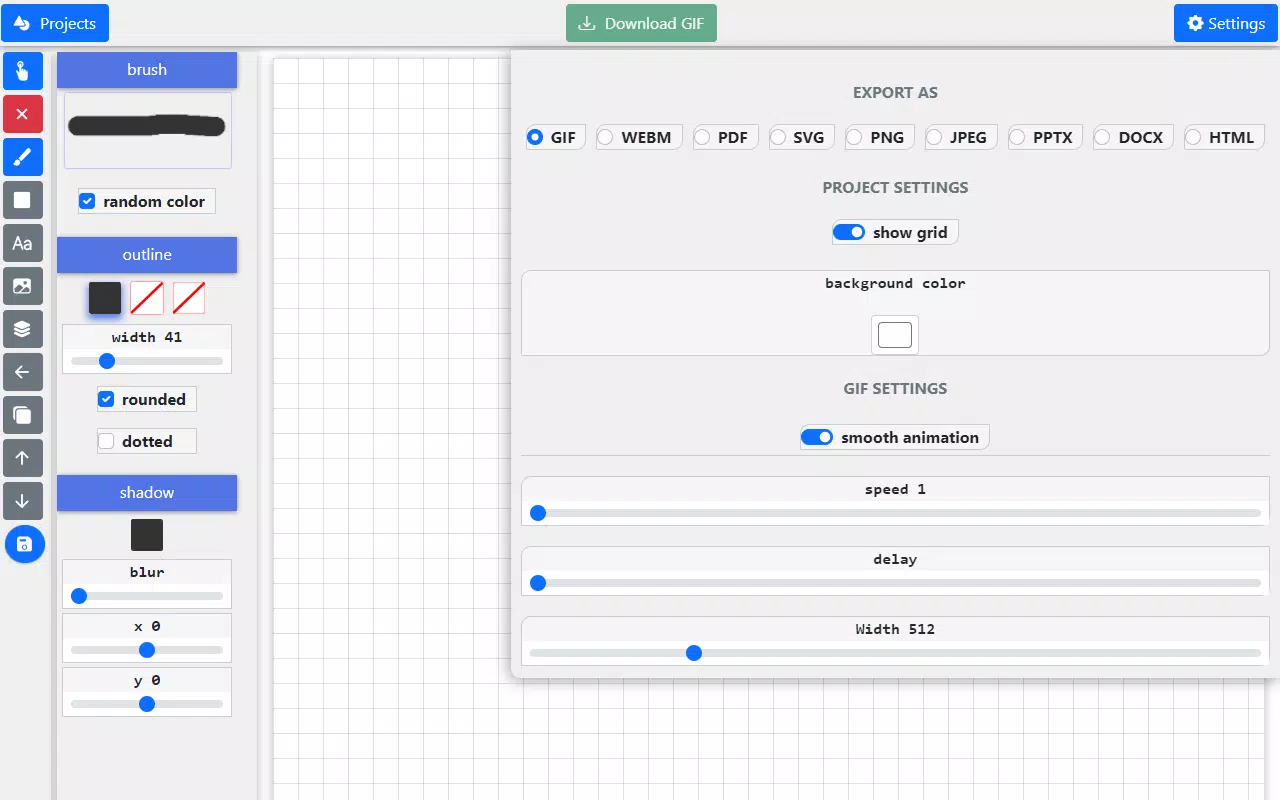
- Multi-Format Export Support: Users can save their artwork in various formats, including GIF, Video, Image, PDF, SVG, DOCX, and PPTX. This enables seamless integration with different platforms and workflows, whether for personal sharing, academic submissions, or professional presentations.
- User-Friendly Interface: The app features an intuitive layout designed for minimal learning curve. Navigation is straightforward, with tools logically arranged and accessible through a clean, uncluttered interface, making it ideal for both new and returning users.
- High-Quality Output Preservation: Regardless of the export format, the app maintains visual fidelity, ensuring that intricate details and color accuracy remain intact. This is particularly beneficial when sharing or printing digital artwork.
- Real-Time Sketching Experience: The app supports smooth drawing input, allowing users to create lines and shapes with consistent responsiveness, enhancing the natural feel of digital sketching.
- Lightweight Design: With a file size of 25.3 MB, Paint a File is optimized for efficient performance on a range of Android devices, minimizing storage impact while delivering core functionality.
For example, a student can sketch a diagram in the app, export it as a PDF for a report, or convert it into a GIF for a class presentation. A freelance designer might use it to quickly draft a logo in SVG format or embed a sketch directly into a DOCX document. These practical applications highlight how the app bridges the gap between casual creation and professional utility.
Interface, UX & Performance
The user interface of Paint a File reflects a minimalist design philosophy, emphasizing clarity and functionality. Tools are arranged in a logical, accessible layout, with primary functions such as brush selection, color palette, and export options placed within easy reach. The visual style is clean, with sufficient contrast and spacing to reduce visual fatigue during extended use.
Navigational flow is consistent across screens, with intuitive gestures and button placement that align with common Android interaction patterns. Users can switch between tools and layers without unnecessary steps, promoting a fluid creative process. Although the developer did not list formal performance metrics, the app’s lightweight footprint suggests optimized resource usage, likely contributing to smooth operation on mid-range and high-end Android devices.
Responsiveness appears to be a priority, with minimal lag during drawing and export processes. Stability is maintained across typical usage scenarios, though real-world testing on a variety of devices has not been disclosed. The app does not report any known crashes or freezes in standard operation. Overall, the UX is designed to minimize friction, allowing users to focus on their creative output rather than technical hurdles.
Platform Compatibility & Technical Requirements
Paint a File is available exclusively on the Android platform, making it accessible to users of Android smartphones and tablets. The current version is 1.0.2, released on August 6, 2024. The app’s file size is 25.3 MB, indicating a compact and efficient installation that does not strain device storage.
The developer did not specify minimum OS requirements or device compatibility details. As such, it is unclear whether the app supports older Android versions or requires a specific hardware configuration. Compatibility information was not fully disclosed, so users should verify functionality on their specific devices. No additional permissions or system-level access were mentioned in the provided data.
Pros and Cons
Pros
- Supports multiple export formats, enhancing versatility across personal and professional use cases.
- Intuitive interface designed for users of all skill levels.
- Lightweight installation at just 25.3 MB.
- High-quality output preservation across different file types.
- Free to download and use, with no upfront cost.
Cons
- Specific OS requirements were not listed, limiting clarity on compatibility.
- Developer background and support channels were not disclosed.
- No information on cloud sync, collaboration features, or advanced editing tools.
- Real-world performance on low-end devices was not confirmed.
- Limited details on update frequency or future feature roadmap.
FAQ
Is Paint a File safe to download and install?
Yes, the app is available through official Android channels and is free of known malware. It does not require root access or excessive permissions, making it a secure option for users seeking a creative tool.
Can I use Paint a File on iOS devices?
As of now, Paint a File is only available on Android. There is no official iOS version released or announced.
What file formats can I export my artwork to?
You can export your creations in multiple formats, including GIF, Video, Image, PDF, SVG, DOCX, and PPTX, allowing for flexible sharing and integration.
Does Paint a File require an internet connection?
No, the app functions fully offline. All drawing and export processes occur locally on the device, ensuring privacy and uninterrupted use.
How often is Paint a File updated?
The latest version is 1.0.2, released on August 6, 2024. The developer has not provided a public update schedule or roadmap.
Final Thoughts + CTA
Paint a File emerges as a promising entry in the digital art and productivity space, offering a balanced blend of simplicity and functionality. Its ability to export to diverse formats like PDF, DOCX, and SVG sets it apart from many basic sketching apps, making it more than just a drawing tool—it’s a creative utility for real-world tasks. The clean interface and lightweight design ensure a smooth experience, particularly for users who value efficiency and minimalism.
While it lacks advanced features such as layer management or cloud collaboration, its core strengths lie in accessibility and practical output. It’s ideal for students, educators, and casual creators who need a reliable, free app to bring their ideas to life. For those seeking a no-frills digital painting solution with broad compatibility, Paint a File delivers strong value.
Download Paint a File now


